

A portfolio website that shows your best work.
Add your projects with a cover image, a short write-up, the dates and a link to the live work. They sit on your home page under your own name, next to what your clients say about you. It is included on every plan, Free too.
Updated by Raheel Shan
- Projects with covers, dates and links
- Tied to the roles on your CV
- Shown on your home page
What you get.
Projects with a cover and a link
Each project has a name, a cover image, a short description and a link to the live work or the full case study.
Dated, or still running
Give a project its start and end dates, or mark it ongoing. Visitors see the year on every card.
Tied to the role behind it
Link each project to the job it came from in your CV, so your work and your career tell one story.
On your home page from day one
A new site starts with the portfolio widget in place. It shows your newest projects, up to nine, at the width you pick.
Portfolio layouts, ready to fill
Start your home page from the Portfolio or One-page portfolio template: intro, about, skills, services, projects, testimonials and a work-with-me block.
Clients who vouch for you
Add what clients said, with their name, company and photo, and feature the best quotes on your home page.
How it works.
-
1
Add your projects
Upload a cover, write a few lines, set the dates and paste the link to the work.
-
2
Arrange your home page
Pick a template or place the portfolio widget where you want it, beside your posts, services and reviews.
-
3
Share one link
Send clients to your site. Your work, your CV and your testimonials are all at one address.
Included in every plan, Free too
0% Brandidos transaction fee on every plan. Start free on a brandidos address and upgrade when you are ready.
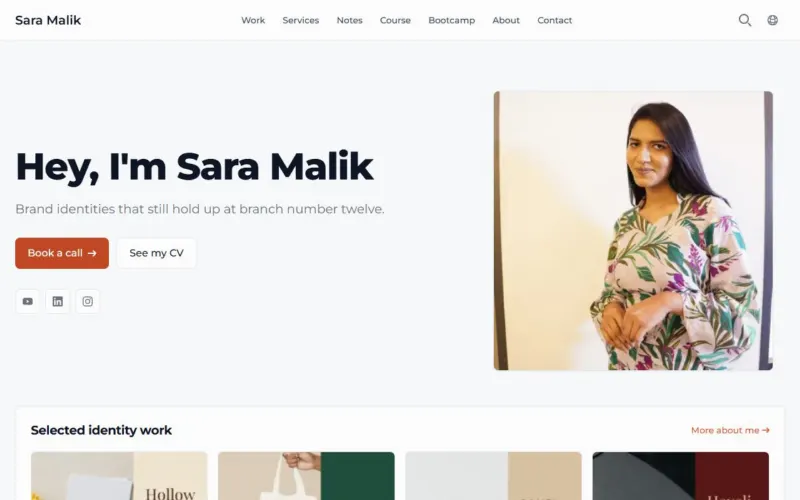
See it on a live site
Sara Malik: Brand designer selling courses and client work.
Questions.
Which plan includes the portfolio?
Every plan, Free included, on a brandidos address or your own domain with HTTPS.
How many projects can I add?
As many as you like. The home page widget shows your newest projects, up to nine at a time.
Which theme suits a portfolio?
All 38 themes show your projects. Verve is built as a one-page portfolio, with big type and bold colour bands.
Can I show client testimonials next to my work?
Yes. Enter a client's words with their name, company and photo, mark it as featured, and the reviews widget quotes it on your home page.
Can I sell my work as well as show it?
Yes. Pro adds books, courses, workshops and bootcamps, and Max adds digital products, bundles, memberships and paid calls.
Put your name on it.
Start with your profile and CV. Add your writing, products and bookings when you are ready.
Start for freeFree plan, no card needed.